Google Sheets trading journal: free template and how to set it up
Google Sheets is the easiest place to keep a trading journal: free, on every device, and easy to share with a mentor. Here's a ready-made template that does more than log P&L, and exactly how to get it into Google Sheets.

The short version
Download the template, import it into Google Sheets, and log every trade the same day. The dashboard tab shows your most expensive mistake and whether you trade your plan. When typing trades gets old, Actal does the same thing from your platform's export file, free during beta.
- You take a few trades a day
- You want a journal on your phone and laptop for free
- You want to share it with a mentor in one click
- You like changing columns and formulas yourself
- You'd rather import trades than type them
- You want every trade checked against your rules automatically
- You want your stats by trade number, after a loss and by size
- You want friends or a group to see your journal
Get it into Google Sheets in a minute
- Download the template (.xlsx) from the button above.
- Open sheets.google.com and start a blank spreadsheet.
- Go to File, Import, Upload, and choose the file.
- Pick "Replace spreadsheet" and click Import data.
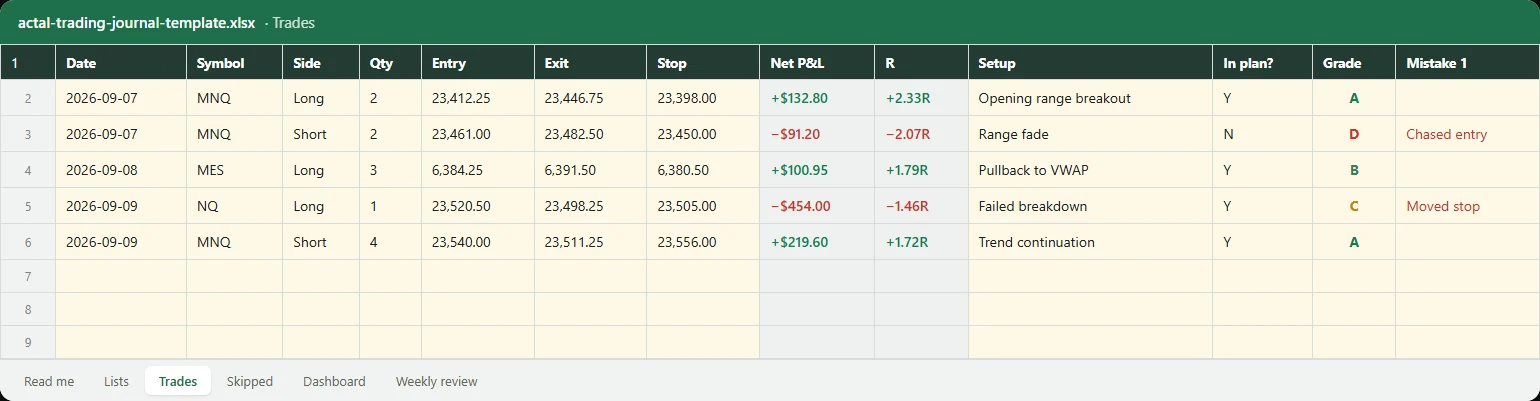
- Delete the five example trades on the Trades tab and start with your own.
Every formula in it uses functions Google Sheets supports (IF, COUNTIFS, SUMIF, INDEX and MATCH), and the dropdowns are plain lists, so they come across in the import. There are no macros or scripts.
What's in the template
| Tab | What it does |
|---|---|
| Trades | One row per trade. Points, gross, net, risk and R calculate themselves. You add the setup, whether it was in your plan, a grade from A to F and the mistake if there was one. |
| Skipped | Setups you didn't take and why, so a hesitation has a price too. |
| Dashboard | Win rate, expectancy, profit factor, results by grade, what each mistake cost, and in-plan vs off-plan P&L. |
| Weekly review | One row a week, with a process score and the one thing you're fixing. |
| Lists | The dropdowns. Rename the setups and mistakes to your own. |
Using it on your phone
Install the Google Sheets app and the same file is on your phone. Dropdowns work on mobile, so logging a grade and a mistake after the session takes a few taps. Keep the typing for the evening on a laptop; on the phone, just grade and tag.
To share it with a mentor, click Share and add their email as a commenter. They can leave notes on single trades without changing your numbers.
Where Google Sheets runs out
- Typing every trade. With five trades a day that's 25 rows a week, and the days you skip are usually the bad ones.
- Partial fills and scaling in or out are hard to log by hand.
- It can't check your rules for you. A daily loss limit in a spreadsheet only works if you look.
- Breakdowns like "how does my trade after a loss do" mean building your own formulas.
That's what Actal is for: it reads your platform's export, checks every trade against your rules, and shows where the money goes, including after a loss, by trade number of the day and by size. It's free during beta. Or stay with the sheet; it beats no journal at all.
Who wrote this
I'm Joakim. I trade index futures full time and coach traders at Jusell Trading Academy. Every student I coach starts with a spreadsheet like this one, so the columns are the ones I actually look at when we go through a week together.
Questions people ask
Drop in one export. In a minute Actal grades the trades it can, prices the mistakes you tagged, and tells you the first thing to fix. Free during beta, no card.

Full-time index futures trader. Coaches traders one-on-one at Jusell Trading Academy, five students at a time, since 2020. No platform was built for developing traders, so he had his own coaching software built; old students loved it and kept coming back, and Actal is that software turned into a proper journal for what matters.