Free trading journal template for Excel and Google Sheets, built by a trading coach
Every free trading journal template tracks your money. This one tracks how you traded: a grade on every trade, a running cost per mistake, whether the trade was in your plan, the setups you skipped, and one thing to fix each week. No email, no catch.

The short version
Download the template, log a month of trades honestly, and run the Friday review. It will tell you your most expensive habit and whether you trade your plan, which is more than most paid journals manage. When the typing gets old, Actal does the same loop from your platform's export file, free while in beta.
- You take a few trades a day and typing them in is not a chore yet
- You want to own the file and change every column
- You want to see whether the review habit sticks before you commit to any tool
- You want trades in from NinjaTrader, Tradovate, Rithmic, Sierra or TradingView without typing
- You want the grades, mistake costs and plan adherence computed for you every day
- You want the weekly focus picked from your numbers and tracked with live progress
- You want friends or a group to see the journal and keep you honest
Download the template
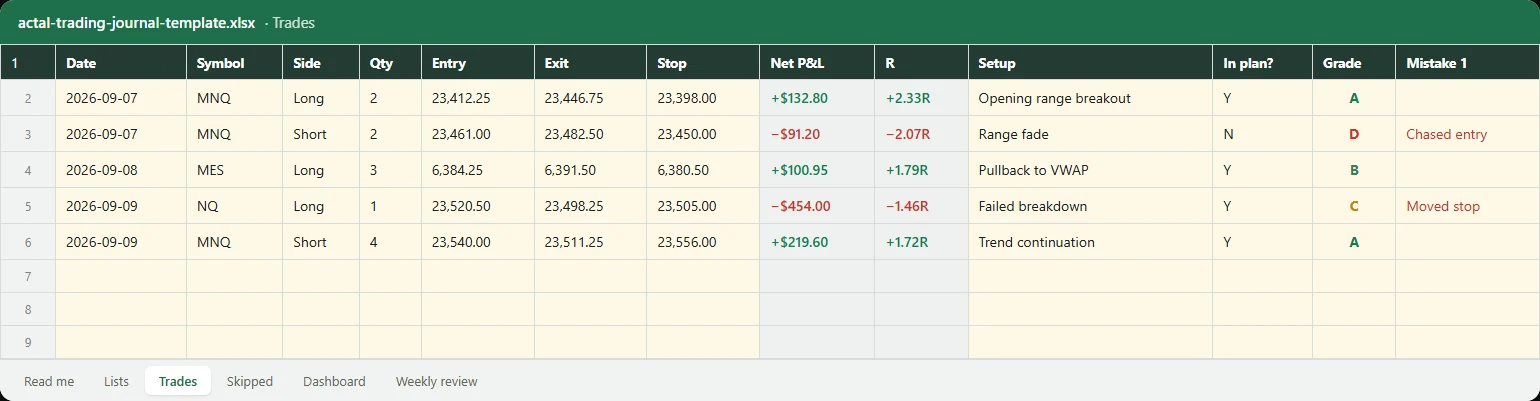
It ships with five example trades and two skipped setups so you can see the format. Delete them and start. Amber cells are yours to type in; grey cells are formulas.
What is inside
| Sheet | What it does |
|---|---|
| Trades | One row per trade: date, symbol, side, size, entry, exit, stop, point value, fees. Points, gross, net, risk and R calculate themselves. Then the part other templates skip: setup, in plan or not, a grade from A to F, up to two mistakes, a note and a lesson. |
| Skipped | The setups you did not take, with a reason. Hesitation, missed it and size count as misses. Not in the plan, rule limit and felt the pull but said no count as good skips. Record what it did if taken, so a miss has a price. |
| Dashboard | Win rate, expectancy, profit factor, total R. Then results by grade, what each mistake has cost you, net P&L in plan versus off plan, clean trades versus mistake trades, and the R you left on missed setups. |
| Weekly review | One row per week: trades, share graded A or B, share clean, share in plan, missed setups, and a process score out of 100. Next to it, the one thing you are fixing that week and whether it happened. |
| Lists | The dropdowns. Setups and mistakes are yours to rename and extend. The grade scale and skip reasons stay, because the dashboard reads them. |
Everything is a plain formula, no macros, so it opens in Excel, Google Sheets, Numbers and LibreOffice. Point values for MNQ, MES, NQ and ES are in the read-me; shares use 1.
How to use it in ten minutes a day
- Before the open, write one line in the Weekly review sheet: the one thing you are fixing this week. Monday's line is the whole week's plan for your behaviour.
- After close, add every trade. Type the fills, pick the setup, mark whether it was in your plan, and grade it A to F for how you traded it, not for what it made. A winning trade you were not supposed to take is a D.
- Tag the mistake when there was one. Be specific: moved stop, chased entry, oversized. Vague tags produce a vague dashboard.
- Log the setups you skipped. Two kinds matter differently: a disciplined skip is good execution, a hesitation is a mistake that never cost money on paper. Record what it did afterwards, so the miss gets a price too.
- On Friday, open the Dashboard. Read the mistake table first. The most negative row is next week's one thing. Then read the Weekly review row and answer honestly whether this week's one thing happened.
What the numbers mean
- Expectancy per trade is what a trade is worth on average. It is the one number that says whether you have an edge, and it needs a few dozen trades before it means anything.
- Profit factor is gross wins divided by gross losses. Under 1 you are losing, around 1.5 you are fine, above 2 you are probably under-sizing.
- R is net P&L divided by the dollars you risked at the stop. It puts a 1-lot scalp and a 4-lot swing on the same scale, which is why the grade table and the skipped sheet report in R.
- By grade shows what your A trades make versus your D trades. If your A trades lose money, the setup is wrong. If your D trades make money, you are being paid to build a bad habit.
- Mistake cost is the net P&L of every trade that carried that mistake. It is not the cost of the mistake alone, but it is the number that makes people stop arguing with the tag.
- Plan adherence is the share of trades that were in your written plan. In-plan versus off-plan P&L, side by side, is the fastest way to find out whether your plan is the problem or your following of it is.
- The weekly score weights A or B grades at 40, clean trades at 35 and in-plan trades at 25. It is a process score. A losing week executed to plan scores high, and that is the point.
What most free templates miss
I looked at the templates that rank for this search before making this one. They are good at the ledger: entry, exit, P&L, win rate, sometimes a profit factor and an equity curve. Almost none of them have a grade for the decision, a cost per mistake, a column for whether the trade was in the plan, a place for the trades you skipped, or a weekly review that forces one thing to fix. Those five are the difference between a record and a journal, and they are the five things this template adds.
| Typical free template | This template | Actal | |
|---|---|---|---|
| Entries, exits, P&L, win rate | Yes | Yes | Yes, from your platform's export |
| R multiple and risk per trade | Sometimes | Yes, from the stop | Yes |
| Grade on the decision | No | A to F per trade | A to F per trade, execution score per week |
| Cost per mistake | No | Net P&L per mistake tag | Running dollar cost, biggest first |
| In plan or off plan | No | Y or N per trade, adherence and P&L split | Plan with scenarios, closed out, adherence tracked |
| Skipped setups | No | Reason, good skip or miss, what it did | Reason, outcome, counts against the score |
| Weekly review | No | Score, one thing to fix, did it happen | One focus picked from your numbers, live progress |
| Screenshots and chart drawing | No | No | Yes |
| Price | Free | Free | Free during beta, founder's price for life after |
Using it in Google Sheets
- Open Google Sheets, then File, Import, Upload, and choose the downloaded file.
- Pick Replace spreadsheet, or Insert new sheets if you already keep a workbook.
- Check the Trades sheet: the grey columns should show the example numbers. If they show zeros, the import did not convert formulas; import again with the default options.
- Dropdowns, conditional colours and number formats carry over. The only thing Sheets changes is the font.
When to move on from the spreadsheet
The sheet earns its place for as long as you fill it in the same day. The moment it is a week behind, it is a diary, and the Friday review stops happening because there is nothing honest to review. That usually arrives somewhere between five trades a day and the second month. Actal runs the same loop from your platform's export file: trades come in with a minute of effort, the grade and mistake screen is one keystroke per answer, the plan is filed and closed out in the same app, and the weekly focus is picked from your numbers. The spreadsheet comparison covers the trade-offs honestly.
How this template was made
I coach futures traders one-on-one at Jusell Trading Academy and I trade index futures every day. Every student started on a spreadsheet template I gave them, and this is that template, cleaned up and with the discipline columns my coaching depends on. Actal is my product; the template is free with no email, and it is useful whether or not you ever open the app.
Questions people ask
Drop in one export. In a minute Actal grades the trades it can, prices the mistakes you tagged, and tells you the first thing to fix. Free during beta, no card.

Full-time index futures trader. Coaches traders one-on-one at Jusell Trading Academy, five students at a time, since 2020. No platform was built for developing traders, so he had his own coaching software built; old students loved it and kept coming back, and Actal is that software turned into a proper journal for what matters.