Trading journals that record video of your trades
Most journals only have the file your platform exports, which is prices and times. A few can also show you what was on your screen when you took the trade. I went through every journal I could find that does this by itself, on each tool's own website in November 2026, and I've included the one I built, Actal.

The short version
Three journals record video of your own screen for each trade: Actal with Actal Recorder, SCS Trading Journal and Recap. TradeTracer, Trarity and TradesViz take screenshots by themselves but no video. TradeZella, TraderSync and Tradervue replay the market from price data or let you upload pictures yourself, so you never see your own chart. Actal is the one that gives you a clip of each trade and a picture of every fill, on the trade in a full journal.
- You trade only Sierra Chart or NinjaTrader 8 and want everything in one Windows app (SCS)
- You're happy with your stats journal and only want the video next to it (Recap)
- A screenshot at entry and exit is enough and you trade from ATAS (Trarity) or NinjaTrader (TradesViz)
- You want a clip of every trade and a picture at every entry, add, scale-out and exit
- You trade from MotiveWave, ATAS, Sierra Chart, NinjaTrader, Quantower, Bookmap, Rithmic, Tradovate or TradingView
- You want the clip on the trade, next to your grade, your notes and your mistakes
- You want the full recording to stay on your PC, with only the trades you import uploaded
A recording of your screen or a replay of the market
Many journals offer trade replay. Replay rebuilds the trade from market prices, so you watch candles form with your entry and exit marked on them. It's a chart the journal drew. Your own indicators, the levels you drew, your footprint or your DOM aren't in it.
A recording shows exactly what you were looking at when you clicked. Screenshots sit in between. A picture at entry and exit shows your chart at two moments, and misses everything in between, including your adds and scale-outs, unless the tool takes one at every fill.
These are the questions I'd ask about any tool here:
- Does it record video, take pictures, or replay prices?
- Does it capture every fill, or only the entry and the exit?
- Does it work with the platform you trade from?
- Where is the footage kept, and what leaves your computer?
- Is it a full journal, or a recorder you use next to one?
The journals compared
| Tool | What it captures by itself | How | Platforms | Price with capture |
|---|---|---|---|---|
| Actal | A picture at every entry, add, scale-out and exit, and a clip of each trade | Actal Recorder, a Windows 10 and 11 app that records the windows you pick | Records any window you pick; imports from ATAS, Sierra Chart, MotiveWave, NinjaTrader, Quantower, Rithmic, Tradovate, TopstepX and more | Pro+, $25 a month |
| SCS Trading Journal | 4 to 6 screenshots per trade, and a video of each trade if you turn video on | Windows app with a Sierra Chart add-on and a NinjaTrader 8 connector | Sierra Chart and NinjaTrader 8 | $19.99 a month, sold together with their trade manager |
| Recap | A video clip of each completed trade, cut from a recording of the whole session | Windows 10 and 11 app that needs a graphics card able to encode video | Sierra Chart, NinjaTrader and MotiveWave; Quantower, ATAS and Tradovate in beta | No price listed; 30-day free trial |
| TradeTracer | Screenshots at entry and exit | Not stated | NinjaTrader, Quantower, ATAS, Sierra Chart, Tradovate, Rithmic and TradingView | €29.99 a month, or €18.99 a month yearly; 14-day trial |
| Trarity | Screenshots at entry and exit, taken when the trade closes | An ATAS indicator | ATAS for screenshots; other platforms by import | No price listed; free tier and 30 days of full access |
| TradesViz | A screenshot at each fill, if you turn it on | A NinjaTrader 8 indicator | NinjaTrader 8 | Free plan; Pro €12.59 a month |
| TradeZella, TraderSync, Tradervue | Nothing by itself. Replay rebuilt from market prices, or pictures you upload | No capture | No capture | TradeZella's replay comes with Pro, $59 a month |
I checked all of this on each tool's own website on 21 November 2026. Prices change, so check before you buy. TradeTracer and TradesViz show their prices in euros. Recap describes itself as a film room to use next to your stats journal, so it has no stats of its own.
How Actal Recorder works
- Actal Recorder is a small Windows app for Windows 10 and 11. You choose the windows you trade from once. It knows windows from ATAS, Sierra Chart, MotiveWave, NinjaTrader, Quantower, Bookmap, Jigsaw, Rithmic, Tradovate and TradingView, and it reads the market from the window title, so your ES chart goes with your ES trades.
- It records those windows on your own computer while you trade. You can have it ask first, start by itself when your trading screens open, or wait until you press Start.
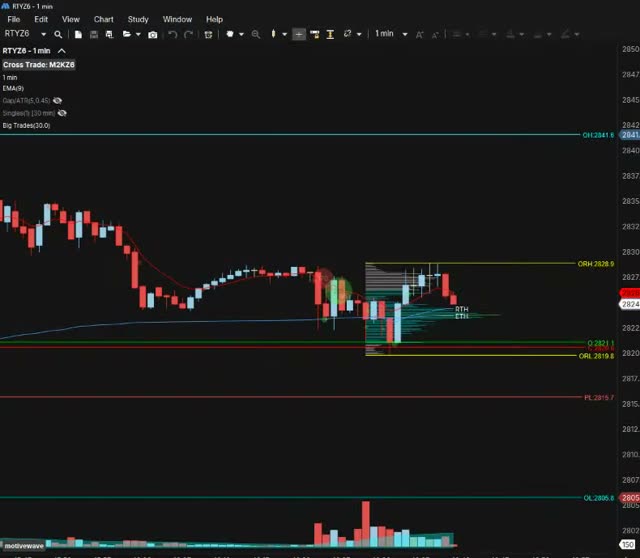
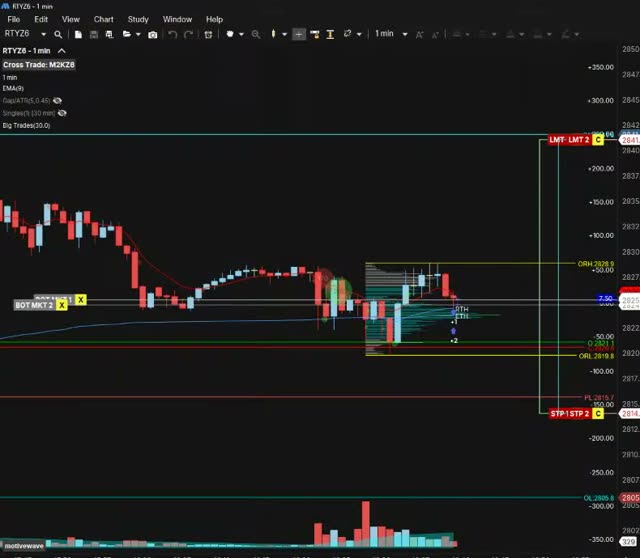
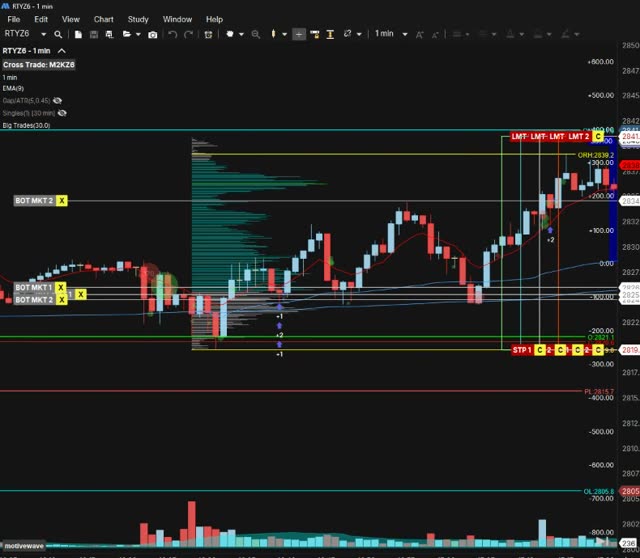
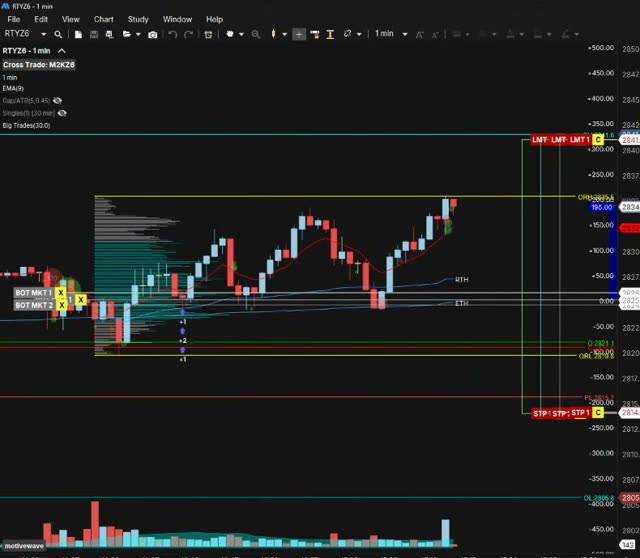
- After the session you import your trades like you normally would. The recorder takes a picture at every entry, add, scale-out and exit, cuts a clip of each trade, and they show up in your journal on that trade.
- The clip has a mark for every execution, so you can skip straight to the second add or the exit.
Where the footage is kept
Recap and SCS keep everything on your computer. That's private, and it also means the clips only exist on that one PC.
Actal Recorder keeps the full recording on your computer too, and deletes it after the number of days you pick. Only the pictures and clips of the trades you import go to Actal. They sit on the trade in your journal, so you can open them on your phone or another computer, and nobody else sees them unless you share the trade, with a coach for example.
Which one I'd pick
- If you trade Sierra Chart or NinjaTrader 8 and want one Windows app with screenshots and video, SCS covers it for $19.99 a month.
- If you already have a stats journal you like and only want the video, Recap is built for that.
- If a picture at entry and exit is enough, Trarity on ATAS and TradesViz on NinjaTrader do it.
- If you want every fill, the clip, and your grade and mistakes on the same trade, that's why I built Actal Recorder.
I'm Joakim. I trade index futures full time from MotiveWave and coach traders one-on-one at Jusell Trading Academy. Of the other tools here, only Recap works with MotiveWave. The trades I most needed to look at again were the fast ones and the bad ones, and those are the ones nobody stops to screenshot. Now every fill shows up in my journal with a picture.
Questions people ask
Actal Recorder records your charts while you trade. When you import, a picture of every entry, add and exit and a clip of each trade show up in your journal. It runs on Windows 10 and 11 and comes with Pro+. The journal itself has a Free plan, and you don't need a card.
Full-time index futures trader. Coaches traders one-on-one at Jusell Trading Academy, five students at a time, since 2020. No platform was built for developing traders, so he had his own coaching software built; old students loved it and kept coming back, and Actal is that software turned into a proper journal for what matters.