Best trading journal for order flow traders
I read the footprint every morning on ES, YM and RTY. When I look back at a trade, I want to see what the footprint showed when I clicked. The file your platform exports only has prices and times, so most journals can't show you that. Below is what I'd look for in a journal for order flow, and how Actal does it.

The short version
Pick a journal that can show you the screen you traded from. Your fills tell you the price and the time. The footprint or the DOM at that moment tells you why you took the trade. Actal imports your fills from ATAS, Sierra Chart, MotiveWave, NinjaTrader, Quantower, Rithmic and Tradovate. Actal Recorder (Windows 10 and 11) records your screen while you trade, and when you import, a picture of every entry, add and exit and a clip of the trade show up in your journal.
- It only has your fills and none of the order flow
- Its replay rebuilds candles from prices, so there's no footprint or DOM
- You only have pictures of the trades you remembered to screenshot
- It can't tell you which mistake costs you the most
- You see your footprint or DOM at every entry, add and exit
- Each trade has a clip you can skip through execution by execution
- It imports from the order flow platforms you already use
- It grades every trade on your plan and puts a dollar cost on each mistake
What an order flow journal needs
Most journals are built around your export: symbol, side, size, entry, exit and P&L. For an order flow trade, that's only the result. The reason you took it was on the screen, in the tape, in bids that wouldn't move, in delta that stopped confirming. If you can't see that again later, you're reviewing from memory.
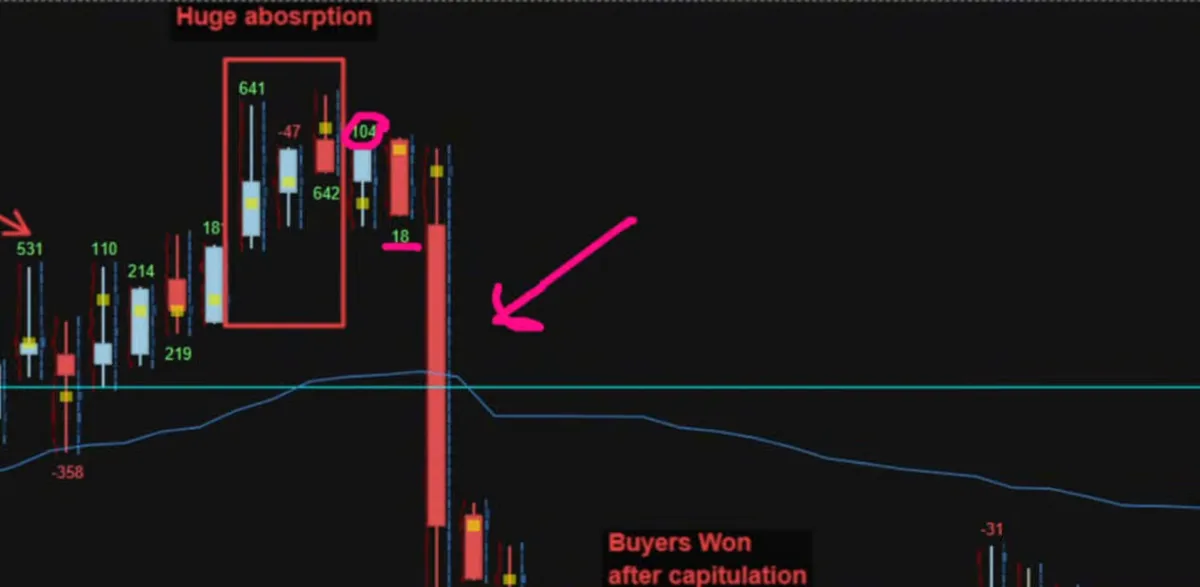
- A picture at every execution. Entry, every add, every scale-out and the exit. If you scale in and out, each fill had its own reason.
- A clip of the trade. Absorption and pulled bids happen over a few seconds, and a single picture often misses it.
- Nothing to press during the trade. If it needs a hotkey, you'll forget it on exactly the trades you want to look at later.
- Your platform's fills imported with commissions, with adds and scale-outs kept together as one trade.
- A clear answer on each trade: did it follow your plan, and if it didn't, what did that cost you?
How Actal Recorder works
Actal Recorder is a small Windows app (Windows 10 and 11). You choose the windows you trade from once, like your footprint, your DOM, Bookmap or a normal chart. It knows windows from ATAS, Sierra Chart, MotiveWave, NinjaTrader, Quantower, Bookmap, Jigsaw, Rithmic, Tradovate and TradingView, and it reads the market from the window title, so your ES footprint goes with your ES trades.
- It records those windows on your own computer while you trade. You can have it ask first, start by itself when your trading screens open, or wait until you press Start.
- After the session you import your trades like you normally would. The recorder takes a picture at every entry, add, scale-out and exit, cuts a clip of each trade, and they show up in your journal on that trade.
- The clip has a mark for every execution, so you can skip straight to the second add or the exit.
- The full recording stays on your computer and gets deleted after the number of days you pick. Only the pictures and clips of the trades you import are uploaded, and nobody else sees them unless you share the trade.
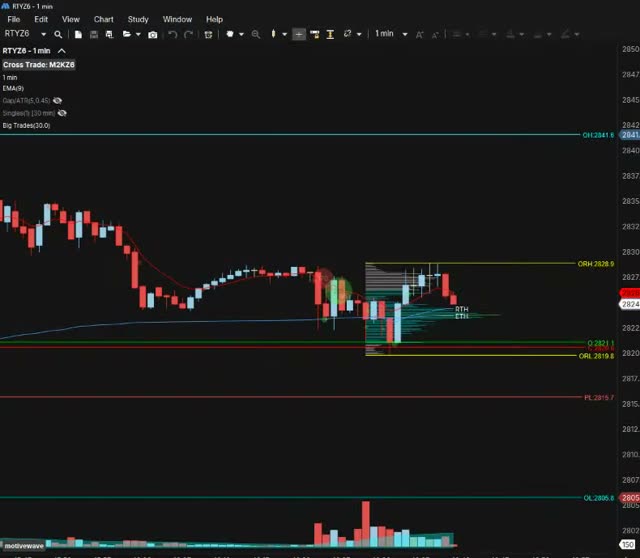
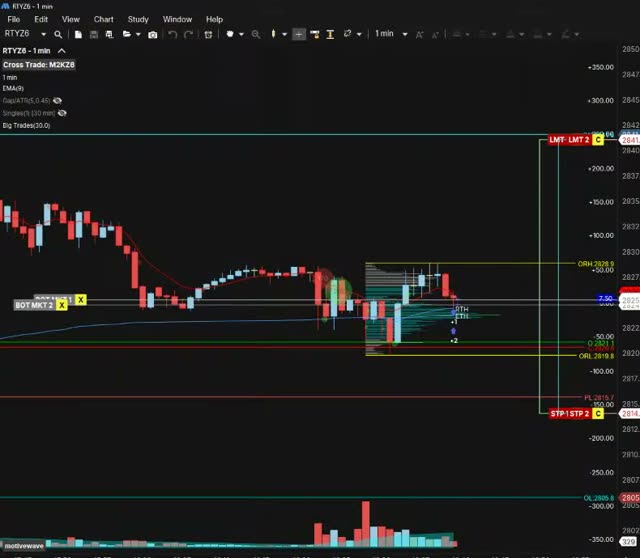
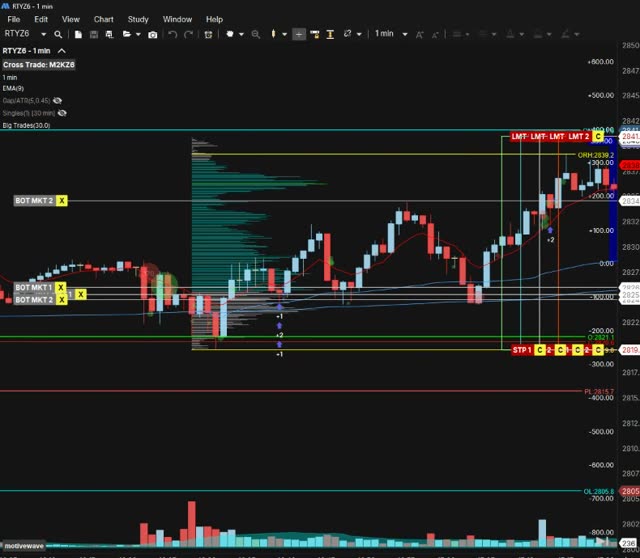
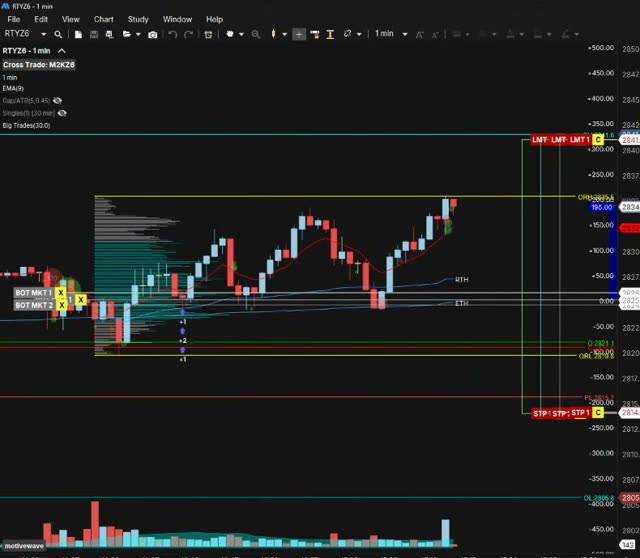
You never take a screenshot. The trades you most need to look at again are usually the fast ones and the bad ones, and those are the ones nobody stops to screenshot.
How I'd review an order flow trade
Open a trade and the pictures and the clip are right there, labelled Entry, Add 1 and Exit, next to your grade, your notes and your mistake tags. This is the kind of picture I want next to a trade when I review it, from the same short as above:
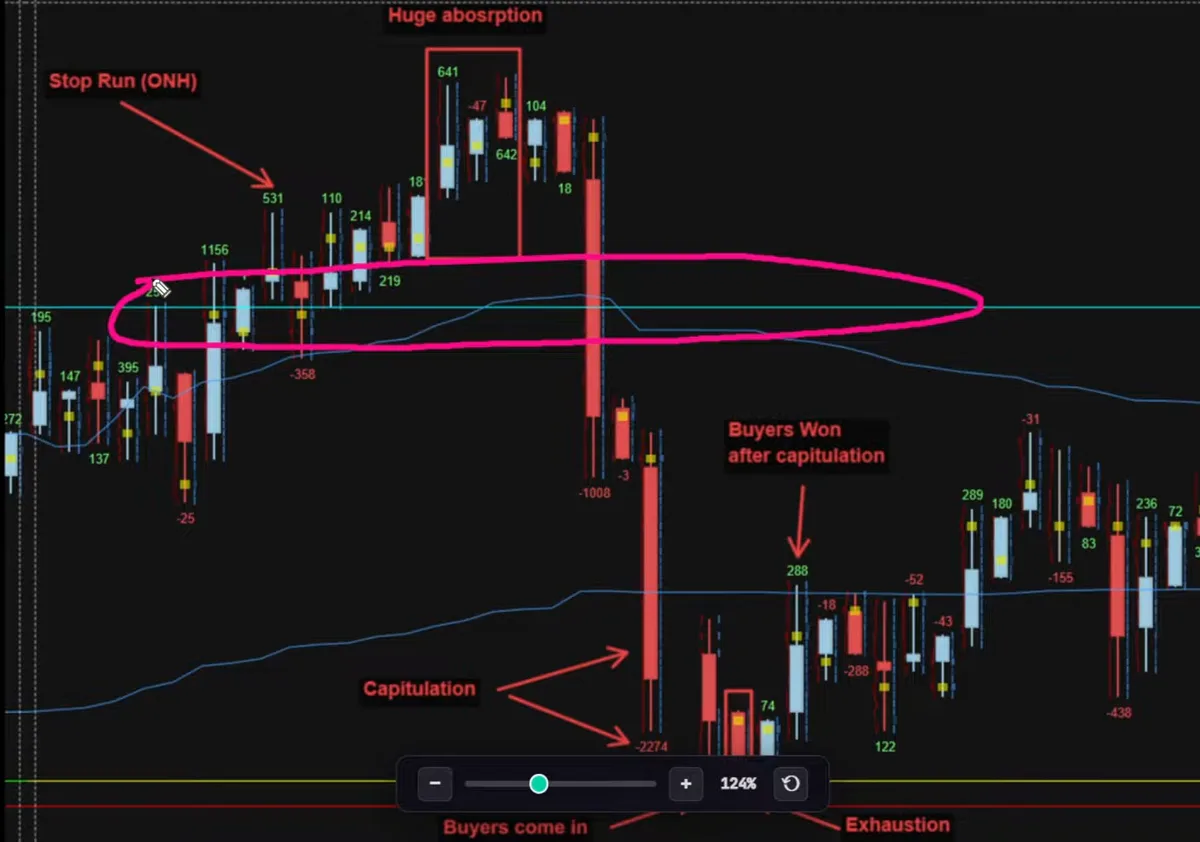
- Entry: was the reason on the screen when I clicked, or did I only see it afterwards?
- Adds: did the order flow back them up, or did I add because price was going my way?
- Exit: did the order flow change, or did I just get nervous?
- Did I follow my plan? If not, tag the mistake. Actal adds up what each mistake costs you over the month, and the most expensive one becomes your focus for next week.
If you want the reading side, I show how I read the footprint every morning, with a real trade review and my setup, on Jusell Trading Academy.
Importing from order flow platforms
| Platform | What to export | Guide |
|---|---|---|
| ATAS | Statistics, the Journal sheet saved as CSV | ATAS import |
| Sierra Chart | Trade Activity Log, Fills or Orders | Sierra Chart import |
| MotiveWave | Account page, Executions export | MotiveWave import |
| NinjaTrader 8 | Trade Performance, Executions tab | NinjaTrader import |
| Quantower | Trades panel export | Quantower import |
| Rithmic R | Trader | Order History, one day per file | Rithmic import |
| Tradovate | Account Reports, Fills or Orders | Tradovate import |
If you trade from Bookmap or Jigsaw, import the fills from the account they route through, Rithmic for example, or use the column mapper with any CSV. The recorder can still record the Bookmap or Jigsaw window.
Your options for journaling order flow
| Option | Order flow at each fill | Work per trade | Mistakes priced |
|---|---|---|---|
| Spreadsheet | Only screenshots you paste in yourself | Every field by hand | Only if you build it |
| Journal with chart replay | Candles rebuilt from prices, no footprint or DOM | Import, then tag | Some do |
| Your platform's replay | Yes, if you saved the market data | Find the time and replay it | No |
| Actal with Actal Recorder | Your own screen at every fill | Import, and the pictures come with it | Yes, in dollars per mistake |
Your platform's replay is a fair option. ATAS and Sierra Chart can both replay the market with order flow if you have the data. The catch is that it isn't next to your trade, your grade and your notes, so you have to go and find the moment every time.
Why I built the recorder
I'm Joakim. I trade index futures full time and coach traders one-on-one at Jusell Trading Academy, five at a time, since 2020. I trade order flow: footprint charts on ES, YM and RTY, with point and figure bars, in MotiveWave on Rithmic.
Actal started as software I had built for my coaching. Students kept using it after we finished working together, so I turned it into a proper journal. I built the recorder because every execution matters. If a journal only shows the entry and the exit, or only the trades you remembered to screenshot, you miss the parts you most need to see again.
Now it records the screens I trade from, and every fill shows up in my journal with a picture. I use it on my own trades.
Questions people ask
Actal Recorder records your charts while you trade. When you import, a picture of every entry, add and exit and a clip of each trade show up in your journal. It runs on Windows 10 and 11 and comes with Pro+. The journal itself has a Free plan, and you don't need a card.
Full-time index futures trader. Coaches traders one-on-one at Jusell Trading Academy, five students at a time, since 2020. No platform was built for developing traders, so he had his own coaching software built; old students loved it and kept coming back, and Actal is that software turned into a proper journal for what matters.