Trading checklist (free PDF): before the open, before every trade, after the close
A checklist does one job: it puts a few seconds of thinking between seeing a move and clicking. This one has the four moments that matter, before the open, before every trade, during the trade and after the close, and a second page to write your own setup checklist. It's a free PDF to print.
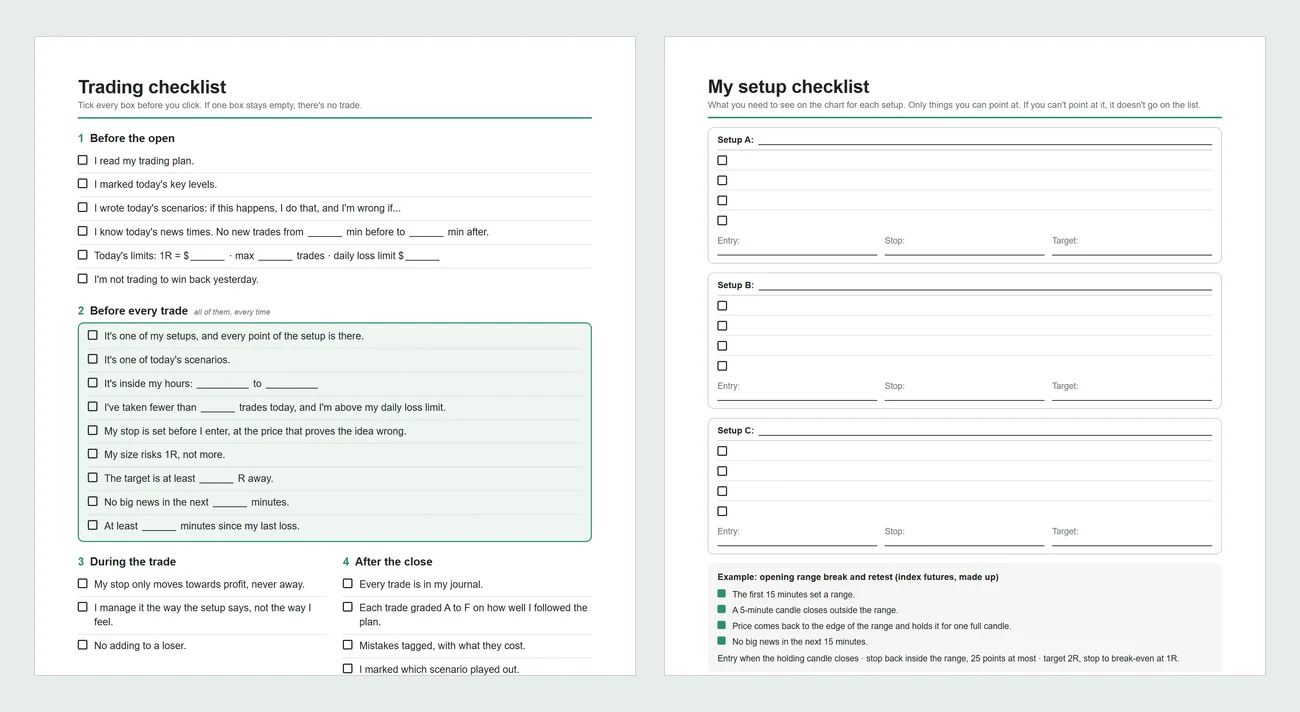

The short version
A trading checklist works when every line can be answered yes or no in a few seconds and you check it before you click, not after. The most important part is the pre-trade list: one of your setups with every point there, inside your hours, under your max trades, stop set first and size at 1R. If one box stays empty, there's no trade.
- The lines are feelings, like "I feel confident"
- It's so long you skip it when the market moves
- You tick it after the trade instead of before
- Every line is yes or no
- Your setup points are things you can see on the chart
- You grade every trade against it afterwards
Get the checklist
- Download the PDF from the button above. No email.
- Fill in the blanks once: your news buffer, 1R, max trades, hours, minimum R and cooldown after a loss.
- Write your setups on page 2. Only things you can point at on the chart.
- Print page 1 and keep it next to your screen. Tick it for real, at least for the first few weeks.
Before the open
- I read my trading plan.
- I marked today's key levels.
- I wrote today's scenarios: if this happens, I do that, and I'm wrong if...
- I know today's news times and won't trade a set number of minutes either side.
- Today's limits are written down: 1R, max trades and the daily loss limit.
- I'm not trading to win back yesterday.
The scenarios are the part most traders skip, and the one that does the most. If price does something that isn't on today's page, you don't have a trade. The trading plan template has a daily page with room for three.
Before every trade
This is the list that matters. Every line, every trade. If one box stays empty, there's no trade.
| Check | Why it's there |
|---|---|
| It's one of my setups, and every point of the setup is there | Half a setup is not the setup. This is the line that stops "it looked good" trades. |
| It's one of today's scenarios | It was planned when you were calm, not decided in the moment |
| It's inside my hours | Keeps you out of the hours you already decided not to trade |
| I've taken fewer than my max trades, and I'm above my daily loss limit | Stops overtrading before it starts |
| My stop is set before I enter, at the price that proves me wrong | A stop set after the entry gets set where it hurts least, not where the idea is wrong |
| My size risks 1R, not more | Stops sizing up because you're sure |
| The target is at least a set number of R away | Stops trades that can't pay for their losers |
| No big news in the next few minutes | Spreads and slippage around news can turn a 1R loss into 2R |
| Enough time since my last loss | Stops the instant re-entry. More in how to stop revenge trading. |
During the trade and after the close
During the trade there are only three lines: the stop only moves towards profit, you manage it the way the setup says, and you never add to a loser. After the close:
- Every trade is in your journal.
- Each trade is graded A to F on how well it followed the plan, not on the P&L.
- Mistakes are tagged, with what they cost.
- You marked which of today's scenarios played out.
- You wrote one thing to do better tomorrow.
The grade is what turns the checklist from a ritual into data. A trade where every box was ticked is an A even if it lost. A trade you took with boxes empty is an F even if it won. After a month you can compare the two groups and see what skipping the checklist costs you.
How to write your setup checklist
Page 2 is for your own setups. The rule is simple: only things you can point at on the chart. "Strong momentum" can't go on the list. "A 5-minute candle closes outside the range" can. Three to five points per setup is enough. More than that and you'll start skipping some.
| Too vague | Can be checked |
|---|---|
| Strong trend | Price above the 20 EMA on the 5-minute, and the last two pullbacks held above it |
| Good level | Yesterday's high, the overnight high or the opening range edge |
| Price respects the level | One full 5-minute candle closes on the right side of the level |
| Good risk to reward | Target at least 2R away, before the next key level |
| Market looks calm | No high-impact news in the next 15 minutes |
The example on page 2 is the same opening range setup used in the trading plan template, so the two work together.
Extra lines for your market
| Market | Add these |
|---|---|
| Futures | Right contract month after the roll. Size worked out from the tick value (futures tick value calculator). |
| Forex | Inside the session you trade. Spread normal for the pair. Lot size from the stop in pips (pip calculator). |
| Stocks | No earnings report today. Enough volume that the spread is tight. Share size from the stop in dollars. |
| Options | Expiry gives the idea enough time. Bid-ask spread small enough to get out. Max loss known before you enter (option profit calculator). |
The position size calculator works out the size that risks exactly 1R for any of them.
Checking it after the fact, automatically
A paper checklist only works if you're honest with it. Actal checks the parts it can after every session. Your rules, like max trades, trading hours, max loss per trade and the cooldown after a loss, are checked on every trade you import, and every break shows with what it cost. Each strategy has its own criteria, which show up as hints while you grade each trade A to F, so the setup checklist and the grade live in the same place. The premarket plan has room for A, B and C scenarios for each market and gets closed out after the session. It's free while in beta.
Who wrote this
I'm Joakim. I trade index futures full time and coach traders one-on-one at Jusell Trading Academy. I built Actal too, so weigh that, but the checklist is free and stays free.
Questions people ask
Drop in one export. In a minute Actal grades the trades it can, prices the mistakes you tagged, and tells you the first thing to fix. Free during beta, no card.

Full-time index futures trader. Coaches traders one-on-one at Jusell Trading Academy, five students at a time, since 2020. No platform was built for developing traders, so he had his own coaching software built; old students loved it and kept coming back, and Actal is that software turned into a proper journal for what matters.